Deploying a Local LLM in the Enterprise: the 2026 Guide
Running a language model on your own hardware keeps your data in-house and removes the per-token bill, and here are the five decisions to make, from a single workstation to a GPU server.
Updated on 26 September 2026: GLM 5.3 and Qwen 3.8 replace the previous generations in the model examples.

Why deploy an LLM locally in your company?
A local LLM keeps data within the company, removes dependence on a remote provider and brings the marginal cost close to zero once the hardware is paid off, and the cost tipping point is covered in our on-premises versus API analysis, while the overall framework is set out in the definition of a sovereign AI platform.
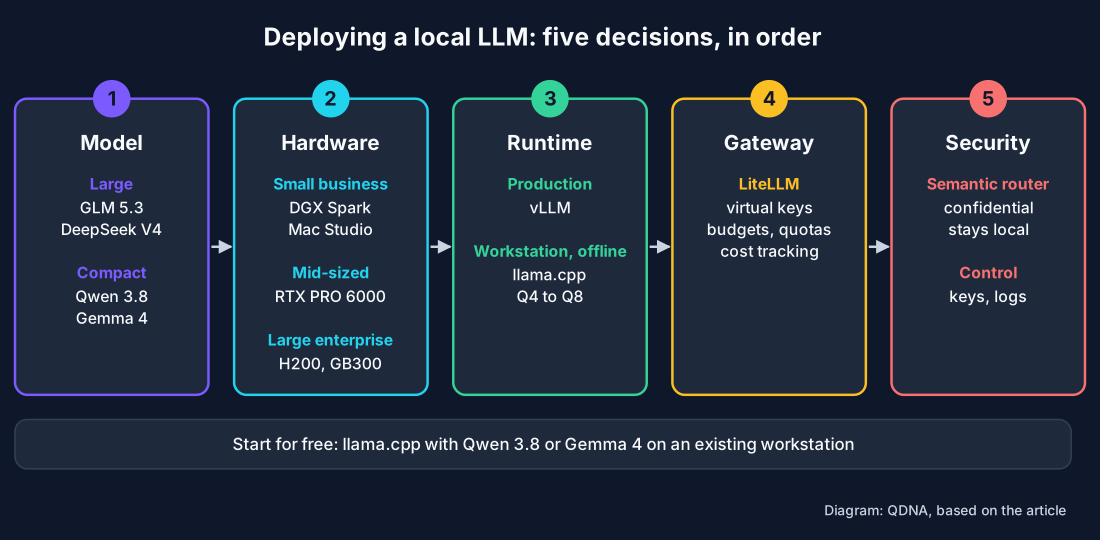
1. Choosing the model
The choice depends on the use case and the hardware available: a large model such as GLM 5.3 or DeepSeek V4 targets reasoning and code; a compact model such as Qwen 3.8 or Gemma 4 fits on a single card, and full detail is available in our comparison of open source LLMs and on our model pages.
2. Choosing the hardware and partners
Hardware ranges from a workstation to a server, since a small business starts on a DGX Spark workstation or a Mac Studio; a mid-sized company equips itself with an air-cooled RTX PRO 6000 server; a large enterprise deploys an H200 or GB300 NVL72 rack.
The computing power rests on NVIDIA GPUs, and the servers are certified by HPE, Dell, Supermicro, Lenovo, ASUS and Gigabyte, bringing the manufacturer support and warranty expected in the enterprise. QDNA advises you on choosing this hardware, from workstation to rack, and the power tiers are detailed on our hardware pages.
3. Choosing the inference runtime
The runtime serves the model. vLLM delivers high-throughput serving for production, with a KV cache, multi-GPU support and an OpenAI-compatible interface. llama.cpp stays lightweight and suits a workstation, offline, with quantisation from Q4 to Q8, and to specialise a model on your own data, Unsloth speeds up fine-tuning.
How does the LiteLLM gateway manage access, quotas and costs?
LiteLLM places a single interface in front of all your models, local and remote alike, where it manages virtual keys per user and per team, budgets, quotas and cost tracking, making spend visible and controlled, switching from one model to another takes a single line of configuration.
5. Security and compliance
The semantic router classifies each request before the call and keeps confidential content on a local model, so data never leaves the infrastructure, which makes GDPR compliance and HDS health-data hosting easier, with virtual keys and logs completing the control.
How do you start for free?
To test without investing, llama.cpp is free and runs a quantised model on an existing workstation, combining the processor and graphics card. A compact model such as Qwen 3.8 or Gemma 4 is enough to validate a use case. Moving to a GPU server becomes necessary once the number of users and the model size grow.
Sources: the vLLM documentation and the LiteLLM documentation, which describe model serving and the gateway with virtual keys and quotas respectively.
Frequently asked questions
How do you host an LLM locally?
Choose an open-weight model, hardware suited to your scale from a workstation to a GPU server, a runtime such as vLLM for production or llama.cpp for a workstation, then a gateway such as LiteLLM for access and quotas. Everything runs on your own infrastructure.
Can you run a local LLM for free?
Yes. llama.cpp is free and runs a quantised model on a workstation, combining the processor and graphics card. A compact model such as Qwen 3.8 or Gemma 4 is enough to get started.
What hardware do you need for a local LLM in the enterprise?
A DGX Spark or Mac Studio workstation for a small business, an RTX PRO 6000 server for a mid-sized company, an H200 or GB300 rack for a large enterprise. The servers are certified by HPE, Dell, Supermicro and Lenovo on NVIDIA GPU hardware.
Is a local LLM GDPR compliant?
Yes. By staying on your own infrastructure, data never leaves the company, which makes GDPR compliance and HDS health-data hosting easier.
Can several models be served on the same infrastructure?
Yes. A gateway such as LiteLLM exposes several models behind a single interface and routes each request to the right model, a compact model for simple tasks and a large model for reasoning. This orchestration optimises hardware use without multiplying servers.
How do you orchestrate several local LLMs?
A LiteLLM gateway exposes a single interface in front of every model, local or remote, which makes them interchangeable. Virtual keys, budgets and quotas are managed there, and applications call one interface only.
How do you route each request to the right model?
A semantic router in front of the gateway classifies each request by embedding similarity. Confidential content stays on a local sovereign model and the rest may overflow to an external API. The nature of the task, code, reasoning or long context, selects the best-suited model.