Running AI locally on your PC (2026)
AI can run on your own machine, without sending your data to the cloud, and from your current PC to the DGX Spark mini-supercomputer, here are the options in 2026.
Updated on 8 October 2026: reference DGX Spark price raised to €7,000 excl. VAT (€8,400 incl. VAT).
Updated on 26 September 2026: GB10 machine prices read on 26 September 2026 (PNY DGX Spark at €5,083 before VAT at LDLC.pro, ASUS Ascent GX10 from €4,889), Qwen 3.8 replaces Qwen 3.6 as the reference compact model.
Updated on 2 September 2026: cluster capacity aligned with the NVIDIA product page (up to 700 billion parameters across four machines; the "Llama 405B on two machines" claim no longer appears there), NVIDIA Sync limits (three machines direct, four via a switch), prices read from dated retailer pages (ASUS Ascent GX10, Framework Desktop, Corsair), HP ZGX Nano added to the table.

Why run AI locally on your PC?
Running a model on your own machine keeps your data at home, works offline and removes any subscription, while remaining the best way to learn. In 2026 the stack is mature: open-weight models rival the APIs, and hardware has taken a leap forward. For an enterprise deployment, the next step is in our guide installing a local LLM.
The free option: your current PC
On an existing machine, free software is enough to get started. Ollama and LM Studio offer a simple setup on Windows, Mac, and Linux; llama.cpp remains the lightweight reference, combining CPU and GPU with quantisation from Q4 to Q8.
The limiting factor is memory, because a compact model such as Qwen 3.8 or Gemma 4, from two to thirty-five billion parameters (Gemma 4 E2B to 31B, Qwen3.8-27B and Qwen3.6-35B-A3B on Hugging Face), runs on a recent computer with a decent graphics card, or on a Mac with unified memory. Model details are covered in our open-weight LLM comparison.
The desktop mini-supercomputer: the GB10 chip
For larger models, a new category has emerged: the desktop AI supercomputer, built on the NVIDIA GB10 Grace Blackwell chip, which combines a twenty-core Arm processor and a Blackwell GPU on a single package, linked by NVLink, with a coherent pool of 128 GB of LPDDR5X memory.
It reaches about one thousand teraFLOPS in FP4, or one petaFLOP with sparsity, in a 150-millimetre-square enclosure.
This 128 GB of unified memory allows a single machine to serve models up to two hundred billion parameters, and, according to the NVIDIA product page read on 2 September 2026, up to seven hundred billion by linking four units over ConnectX-7. NVIDIA's DGX Spark is the reference machine in this family.
The GB10 machines, brand by brand
All these machines share the same GB10 chip, the same 128 GB of memory, the same ports and the same DGX OS operating system, a variant of Ubuntu, so the differences lie in chassis, cooling, storage, remote management, warranty and price, the ConnectX-7 network port accounting for a notable share of the total.
| Machine | Brand | Worth noting |
|---|---|---|
| DGX Spark | NVIDIA | The reference, 128 GB, DGX OS |
| Ascent GX10 | ASUS | Often the cheapest entry point, limited warranty |
| Pro Max with GB10 | Dell | Enterprise finish, support and warranty included |
| AI TOP ATOM | Gigabyte | Chassis and cooling variant |
| ThinkStation PGX | Lenovo | Workstation integration |
| EdgeXpert MS-C931 | MSI | Compact format |
| Veriton GN100 | Acer | Desktop design |
| ZGX Nano G1n | HP | Compact AI station, professional range |
Prices have risen with the memory shortage, and prices read on 26 September 2026 range from €4,889 (ASUS Ascent GX10, 1 TB, best European price listed by Geizhals on 16 September; LDLC no longer sells it, last price €4,499.95 incl. VAT) to €6,348 incl. VAT (PNY DGX Spark, €5,290 excl. VAT at Nelpx, in stock) depending on storage and brand; the reference DGX Spark is at €7,000 excl. VAT, the price used from October 2026 after the observed increase (LDLC.pro reading of 26 September 2026: €5,083 excl. VAT), or €8,400 incl. VAT. Breakdown by tier is available in our AI server price guide.
Stacking DGX Spark units for larger models
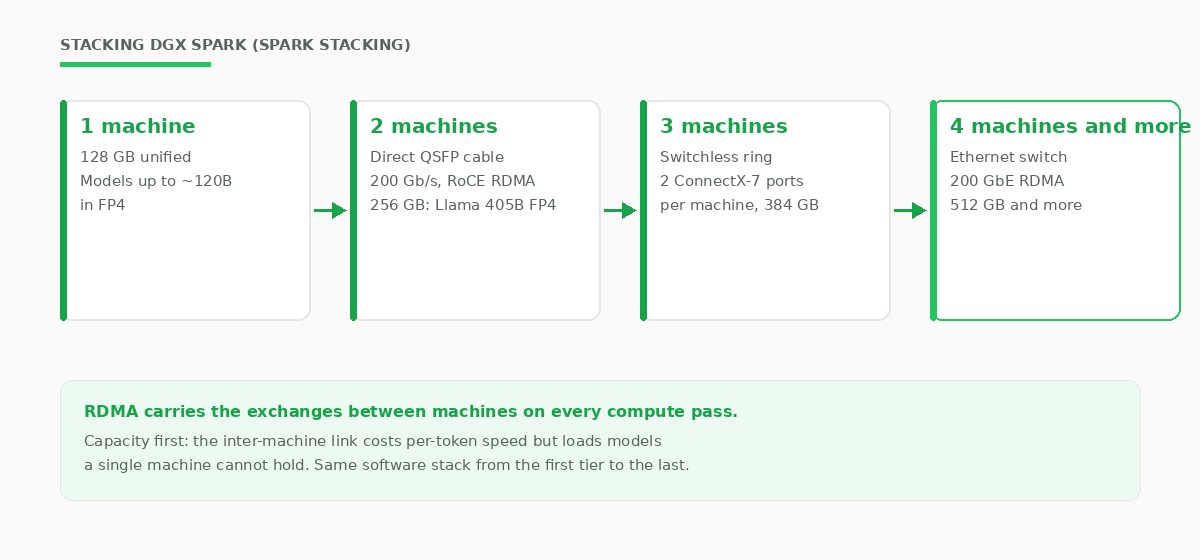
Each GB10 machine carries two ConnectX-7 network ports on the back, at 200 Gb/s, with RDMA over Converged Ethernet (RoCE): the machines exchange compute data without going through the CPU.
NVIDIA documents this setup under the name Spark Stacking, where two DGX Spark units connect via a simple direct QSFP cable with no switch, the pair aggregating 256 GB of memory, with weights split across the two machines by tensor parallelism (two QSFP ports at 200 Gb/s each according to the NVIDIA Spark Stacking guide, re-read on 2 September 2026).
Three machines can still be linked directly using both ports on each unit, and a RoCE-capable 200 GbE Ethernet switch federates four units, the documented limit of the NVIDIA Sync tool: the pool reaches 512 GB and loads mixture-of-experts models that no single machine could hold. The setup remains a desktop cluster, not a rack: past a few units, the next step is a GPU server.
The right expectation is capacity rather than speed, because at each compute pass, the machines exchange activations over the network link, and per-token throughput drops compared with a model that fits on a single machine. Stacking also helps with long contexts: splitting a hundred-and-twenty-billion-parameter model across two machines frees up memory for the conversation cache, allowing longer windows and more simultaneous sessions.
The AMD alternative, on Windows
Outside the CUDA ecosystem, the AMD Ryzen AI Max+ 395 chip, known as Strix Halo, also offers 128 GB of unified memory, at a lower price and on Windows.
The Framework Desktop 128 GB is listed at €3,889 (frame.work, read on 2 September 2026, out of stock) and the Corsair AI Workstation 300 having launched in Europe at €1,999.99 in September 2025 (Corsair press release), a price the vendor has since raised with the memory shortage. These machines draw less power at idle, but the CUDA software ecosystem remains richer on the NVIDIA side.
Which AI model suits your machine?
The precise choice of model is covered in our comparison, and scaling up to a server in the enterprise installation guide.
- Existing PC with a graphics card: a compact quantised model, Qwen 3.8 or Gemma 4, via Ollama or llama.cpp.
- GB10 or Strix Halo machine, 128 GB: a medium to large model, up to two hundred billion quantised parameters.
- Two to four linked GB10 machines: up to seven hundred billion parameters across four, according to NVIDIA.
Frequently asked questions
How do you run AI locally on your PC?
Install free software such as Ollama, LM Studio, or llama.cpp, then a compact model such as Qwen 3.8 or Gemma 4. The whole stack runs on Windows, Mac, or Linux, using your graphics card and processor.
Can you run AI locally for free?
Yes. The llama.cpp, Ollama, and LM Studio software packages are free and run a quantised model on an existing PC. A compact model is enough for personal use.
What is DGX Spark and the GB10 chip?
DGX Spark is a desktop mini-supercomputer from NVIDIA built on the GB10 Grace Blackwell chip, with 128 GB of unified memory and about one petaFLOP in FP4. The same chip powers machines from ASUS, Dell, Gigabyte, HP, Lenovo, MSI, and Acer.
Which GB10 machine brand should you choose?
They share the same chip and the same performance. The ASUS Ascent GX10 targets the lowest price, while the Dell Pro Max focuses on support and warranty. The choice comes down to price, warranty, and integration.
Can several DGX Spark units be linked together?
Yes. Two machines connect via a direct QSFP cable at 200 Gb/s over RDMA and aggregate 256 GB. Three machines can still be linked directly; four go through a RoCE-capable 200 GbE Ethernet switch, and NVIDIA advertises up to 700 billion parameters across four machines.
What performance can you expect from local AI on a PC?
On a recent machine, a compact quantised model generates several tens of tokens per second, enough for a fluid conversation. A GB10 machine such as DGX Spark serves much larger models, with speed then depending on model size and quantisation format, with FP4 delivering the best throughput on Blackwell cards.